
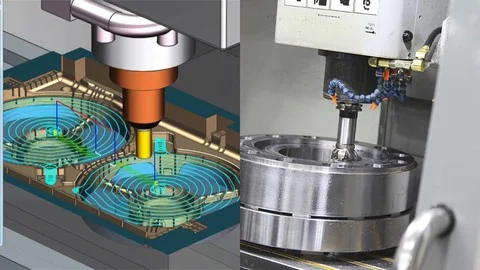
CNC Machining & Programming (G-Code & CAM)
Udemy · Titan CNC Academy · Updated
AI Tutor Rating
8.5/10
Duration
22 hours video
Classes
145
Learn from experienced tradespeople in this career-ready, code-compliant course. CNC machining course covering G-code programming, CAM software (Fusion 360), toolpath strategies, setup procedures, and precision machining techniques. Combines technical theory with hands-on exercises, building your confidence to tackle real projects and pass certification exams.
CNC Machining & Programming (G-Code & CAM) on Udemy, taught by Titan CNC Academy, is a 22-hour, 145-lecture course designed to take learners from foundational CNC concepts through professional-grade programming and machining operations. The curriculum covers G-code writing and editing for mills and lathes, CAM toolpath generation in Fusion 360, machine setup, and precision metalworking techniques. Notably, the course also folds in MIG, TIG, and Stick welding skills alongside blueprint and welding symbol interpretation, making it a broad skilled-trades package aimed at career-ready practitioners.
What you'll learn in CNC Machining & Programming (G-Code & CAM)
Our Review of CNC Machining & Programming (G-Code & CAM)
CNC Machining & Programming (G-Code & CAM) is structured with a logical progression that mirrors how a shop-floor professional actually builds competence. The curriculum opens with foundational CNC architecture and G-code syntax, advances through toolpath strategies in Fusion 360, and closes with real-world applications and optimization, a sequence that prevents learners from being dropped into software before they understand the underlying machine logic. At 145 lectures spread across 22 hours, the average segment runs under ten minutes, which suits the stop-and-practice rhythm that technical skills demand. Titan CNC Academy's framing as experienced tradespeople rather than academic instructors signals a practitioner-first teaching style, and the inclusion of hands-on exercises reinforces that orientation.
The depth-to-difficulty balance here is notable. The course lists only basic mechanical aptitude as a prerequisite, yet the outcomes include writing and editing G-code for both mills and lathes, generating CAM toolpaths in Fusion 360, and performing precision machining operations. That is a meaningful skill arc for a single course, and the presence of Advanced CNC Concepts and CAM Best Practices chapters suggests the material does not plateau early. The addition of MIG, TIG, and Stick welding outcomes alongside blueprint reading broadens the course's value for fabrication-track learners, though it also means the machining and welding threads must share curriculum space, which could feel compressed for someone focused exclusively on one discipline.
At $16.99 with a certificate of completion included, the price-to-content ratio is difficult to argue against. Udemy certificates carry no industry accreditation, but they document course completion for a resume or LinkedIn profile, and the course's stated goal of helping learners pass certification exams suggests the content is mapped to external standards. For anyone weighing the cost of community-college CNC coursework against self-paced online study, this course represents a low-risk entry point with a surprisingly wide skill ceiling.
Pros and cons of CNC Machining & Programming (G-Code & CAM)
Pros
- 22 hours of video across 145 short lectures supports a hands-on, pause-and-practice learning rhythm suited to technical skill-building
- Covers both G-code programming and Fusion 360 CAM in a single course, eliminating the need to purchase separate training for each tool
- Includes welding skills (MIG, TIG, Stick) and blueprint reading, adding fabrication breadth that increases employability across multiple shop roles
- Designed by Titan CNC Academy with a practitioner focus, grounding theory in real-world machining and setup procedures rather than purely academic content
- Certificate of completion included at a $16.99 price point, making it one of the most cost-accessible CNC programming courses available on the platform
Things to consider
- Splitting curriculum between CNC machining and welding means neither discipline receives the full depth a single-focus course could provide
- Udemy certificates are not industry-accredited, so the credential alone will not satisfy employer requirements that specify formal CNC certification
- The course is video-only in format; learners without access to a physical CNC machine or Fusion 360 license will face a gap between watching and genuine hands-on practice
Who should take CNC Machining & Programming (G-Code & CAM)?
CNC Machining & Programming (G-Code & CAM) is best suited for aspiring machinists, fabrication-shop entrants, and career-changers with basic mechanical aptitude who want a single, affordable course covering both G-code programming and Fusion 360 CAM workflows. It also fits working tradespeople looking to formalize or expand their skills across machining and welding disciplines without committing to a full community-college program.
Course curriculum for CNC Machining & Programming (G-Code & CAM)
CNC Machining & Programming (G-Code & CAM) at a glance
| Provider | Udemy |
|---|---|
| Instructor | Titan CNC Academy |
| Level | Intermediate |
| Time to complete | 22 hours video |
| Pricing | $16.99 |
| Certificate | Certificate |
| Prerequisites | Basic mechanical aptitude |
Fit
Best for
Not ideal for
The bottom line on CNC Machining & Programming (G-Code & CAM)
CNC Machining & Programming (G-Code & CAM) delivers a wide-ranging skilled-trades curriculum at a price that removes almost every financial barrier to entry. The combination of G-code, Fusion 360 CAM, and welding skills in one package is genuinely useful for fabrication-track learners. The dual-discipline scope means depth is shared, and the certificate is not accredited, but as a career-launch or skills-refresh investment, the course offers strong practical value.
CNC Machining & Programming (G-Code & CAM): frequently asked questions
What exactly does CNC Machining & Programming (G-Code & CAM) on Udemy teach you to do?
The course teaches you to write and edit G-code programs for CNC mills and lathes, generate toolpaths using Fusion 360 CAM, set up CNC machines, and perform precision machining operations. It also covers MIG, TIG, and Stick welding on various metals and joint configurations, plus reading welding symbols, blueprints, and procedure specifications.
What prerequisites do you need before taking CNC Machining & Programming (G-Code & CAM)?
The only listed prerequisite is basic mechanical aptitude. No prior CNC programming experience, software knowledge, or formal machining background is required, making the course accessible to career-changers and trade beginners who are comfortable working with mechanical concepts at a foundational level.
Is the certificate from CNC Machining & Programming (G-Code & CAM) worth anything to employers?
The Udemy certificate of completion documents that you finished the course and can support a resume or LinkedIn profile. It is not an industry-accredited credential. The course does state a goal of helping learners pass certification exams, suggesting the content aligns with external standards, but the Udemy certificate itself does not substitute for those formal credentials.
How does CNC Machining & Programming (G-Code & CAM) compare to a community-college CNC course?
A community-college CNC program typically offers hands-on machine time, instructor feedback, and an accredited credential, but costs significantly more and follows a fixed schedule. This Udemy course provides 22 hours of practitioner-taught video at $16.99 with flexible pacing. It covers comparable technical ground but cannot replicate supervised machine access or accredited certification.
How should you structure your study of CNC Machining & Programming (G-Code & CAM) to get the most out of it?
Follow the curriculum in sequence, since it is built to progress from CNC architecture and G-code basics through advanced concepts and Fusion 360 CAM before reaching real-world applications. Pause after each lecture to practice the exercise or replicate the workflow shown. If you have access to Fusion 360 and a CNC machine or simulator, run the toolpaths and programs alongside the video content.